Is your documentation ready for AI?

AI just explained my own research back to me. I was surprised by how it showed me the message I meant to say 10 years ago, but seemed to lose in the academic genre of the original articles.

I’m working on how to teach AI tools in my API documentation course. As part of my research, I thought I’d feed some of my technical writing articles from about 10 years ago into an AI tool, along with some contemporary work from others. I asked the AI to compare, contrast, and summarize them from various angles.

The results were interesting enough that I had to write about them here.

When AI becomes your editor

One summary took an analysis I’d buried in academic prose and flipped it into something useful. It linked the different documentation types commonly found in API Documentation to what readers are trying to accomplish:

Original version:

In Using Readers’ and Organizations’ Goals to Guide Assessment of Success in Information Websites (2015), we proposed this list of goals that readers could hope to accomplish in an informational site (e.g. documentation). Examples of each goal were presented later in the 12-page article.

  • Reading to be reminded (Reading to do lite)
  • Reading to accomplish a task in a website (Reading to do here)
  • Reading to accomplish a task outside a website now (Reading to do now)
  • Reading to accomplish a task outside a website later (Reading to learn to do later)
  • Reading to learn (Reading to learn to use later or to apply with other information)

AI’s translation:

  • Recipes and examples for “reading to do now”
  • Topical guides for “reading to learn”
  • Reference guides for “reading to be reminded”
  • Support forums for edge cases and community help
  • Marketing pages for pre-usage evaluation

Then it got right to the point that I’d been dancing around for paragraphs:

Yet we typically measure them all the same way. Page views, time on page, bounce rate. That’s like using a thermometer to measure blood pressure. The tool works fine; you’re just measuring the wrong thing.

Ouch. But also: exactly.

The AI summary went on to suggest what matters for each content type:

Continue reading “Is your documentation ready for AI?”

How to not suffer the curse of knowledge

Photo of Rodin's sculpture of The Thinker (Le Penseur)

Wikipedia says that the curse of knowledge “is a cognitive bias that occurs when an individual, who is communicating with other individuals, assumes that they have the background knowledge to understand.”

I’ve suffered that curse on various occasions, but I think I might have a way to reduce its frequency.

Know your audience.

Thank you for visiting.

Just kidding. There’s more.

Knowing your audience is one of the first things we teach technical writers, but that advice doesn’t quite address the nuance required to vaccinate yourself against the curse of knowledge.

Here are few steps I’ve used.

Step 1. Empathize with your audience

It’s more than just knowing them; it’s understanding them in the context of reading your content. This interaction might be minor in your reader’s experience, but it’s the reason you’re writing technical documentation. It’s extremely helpful to understand your readers in the moments of their life in which they’re reading your documentation.

Know why they’ll be reading your documentation or even just a topic in your documentation. What brings them to that page? What’s their environment like? What pressures are they under? What are their immediate and long-term goals? What would they rather be doing instead of reading your doc?

The reality is that most readers would rather be doing almost anything else but reading technical documentation—so, how can you work with that (besides not writing it)?

Continue reading “How to not suffer the curse of knowledge”

Documentation as offline memory

While researching my dissertation, I came across a quote that resonated with my experience as a developer and at the same time troubled me as a technical writer (so, you’ll see me quote it frequently). It’s from a study published in 20091 about how developers used documentation while completing some programming tasks.

“Several participants reported using the Web as an alternative to memorizing routinely-used snippets of code.”

Just today, this idea was addressed directly in this tweet:

The tweet resulted in this thread. It’s early as I write this and there are only 16 responses, but I expect this to grow.

Thoughts and musings

From a research perspective, it provides a great collection of cases in which documentation is serving as an offline, community memory that many developers share–more evidence of what Brandt et al. observed in their 2009 study.

From a documentation and usability perspective, it’s a sort of rouges’ gallery of usability fails. Flipping through the responses, it’s interesting to see the different ways that usability challenges have been met by users of the tools.

For example,

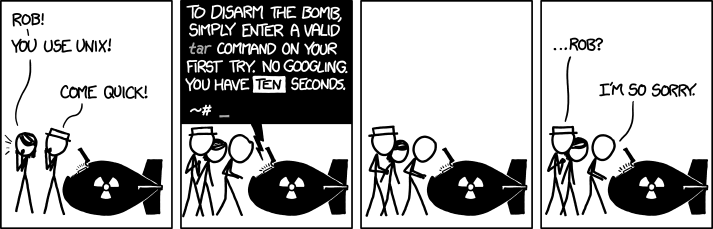
  • Mnemonics, in the case of how to use a tar file described in this thread. The conversation eventually refers to this doomsday scenario, so those mnemonics could save the world, some day.

    TAR, as imagined by xkcd. This work is licensed under a Creative Commons Attribution-NonCommercial 2.5 License.
  • Creating an interpreter to translate English(-ish) to regex (Regular Expressions) in this thread. Other comments also refer to regex a the variety of places on the web that try to clarify its opaque notation.
  • Community-sourced documentation was a method described in this thread. Any user of Unix or Linux is familiar with its man pages. This comment talks about simplified versions of this documentation being collected at TLDR pages. According to the site, “TLDR pages  are a community effort to simplify the beloved man pages with practical examples. “
  • Redirection to StackOverflow in which StackOverflow is the community-supported documentation is another way developers deal with common, but not common-enough to memorize, cases as this comment describes.

What does this mean to technical writers?

There’s a recurring complaint among technical writers that no one reads technical docs. This conversation is evidence that if a feature is useful enough and unintuitive enough, that people will read them (or create work-arounds for them). For self-help content in general, however, I’m not sure that having a lot of documentation access is a worthwhile goal when it’s the result of a larger issue (e.g. a lack of usability). In fact, such traffic is often a clue that something needs attention, either in the product, the documentation, or both.

If, for whatever reason, you can’t make the product easier to use, you can use this list as a source of ideas to apply to your technical documentation strategy and help your readers.


1 Brandt, J., Guo, P. J., Lewenstein, J., Dontcheva, M., & Klemmer, S. R. (2009). Two studies of opportunistic programming: interleaving web foraging, learning, and writing code (pp. 1589–1598). Presented at the Proceedings of the SIGCHI.

Audience, Market, Product Webinar

As I get caught up on overdue blog topics, I want to thank (albeit belatedly) the participants of my webinar, last December. Unfortunately, I was very sick on the day of the event (so being remote was probably best for everyone), but I want to thank them for their patience. The feedback they provided after the course will help me refine the presentation.

In the mean time, the slide deck used in the webinar is available  at: https://docsbydesign.com/wp-content/uploads/2023/10/Audience-Market-Product_stc.pptx

More Audience, Market, Product

In a recent post, I introduced the Audience, Market, and Product framework. Within this framework, it is possible to understand the characteristics of each that influence the documentation plan. During this investigation, you might learn more about each that can also help guide the product development and marketing, in fact, I would be surprised if you didn’t, but I’m going to constrain the scope of this analysis to documentation only.

The previous post described these components of the framework and here, I look at what you need to know about each one to design your documentation plan. In future posts, I’ll describe some of the ways to learn what you need to know about each component.

When reviewing the following points, keep in mind that these aspects can vary over time. For example, the documentation requirements will change as the audience becomes more familiar with the product or the product becomes more (or less) successful in the market. So, it’s important to consider these components as dynamic and not static.

Audience

In looking at the audience, you want to have a clear picture of who the readers are. How will they consume and apply information about the product? This is important to know in order to design the content in a way that they’ll find most useful and effective.

Market

In reviewing the market in which the product is offered, you want to understand the position of both the product and the company in the market. This is essential to develop the rhetorical approach of the documentation that will be most effective for the customer and for the company. For example, does the documentation need to help sell the product or would that tone be inappropriate and counterproductive?

Product

Finally, there’s the product and its aspects that influence documentation. Some of these aspects can be large and obvious, like key features and functionality, while others might appear to be subtle, yet still have considerable impact on the documentation. As with the other components, the ultimate goal of knowing this is to develop a clear picture of what the customer needs to be successful with the product and what the company needs to be successful.

What’s next

In the posts that follow, I’ll present some of the questions to ask in order to find out the what you need to know to design your documentation plan.

Audience, Market, Product

In a podcast-interview I did with Tom Johnson, I mentioned this framework as a way to evaluate technical documentation requirements. The components of audience, market, and product aren’t anything new, nor is considering them in documentation planning. What’s been missing, however, is an effective way to understand them in a way that informs documentation.

This framework is my latest iteration on how to apply the 12 cognitive dimensions of API usability to technical documentation. These dimensions, by themselves, are very difficult to apply for various reasons, but I think the notion of identifying the components and elements of an interaction can be useful—but the method must be usable. So, I’ve taken a step back from the level of detail the 12 dimensions to these three.

In this framework, it’s essential to consider, not just the documentation, but the entire customer experience in which the documentation will reside to correctly assess the requirements. I’m still thinking out loud because I think that there’s some value in lingering on the question(s) before diving into the solution process.

So to review the framework’s components…

Audience

These are the people who will (or who you expect to) read the content. Content includes anything you write for someone else to read. The boundaries of this depend on a lot of local variables, but should include all the content of the entire customer experience. Your audience might be segmented into groups such as  business/purchase decision makers, direct users, indirect users, support, development. You should know how they all interact with the entire customer experience.

Market

For this analysis, the market is the space in which your company or product is acquired. It could be an open-source product that offers a service or benefit similar to others. It could be downloaded from an app store. It could be something sold door-to-door. How your product appears in the space it shares with other similar products influences your content priorities. The more you know about the relationship between your product, its competitors, and its customers, the better you can assess those influences.

Product

Finally, there’s the product itself. How does it work? What does it do? How is it designed? What are its key features and benefits to the customer? What are its challenges? Knowing how the product’s features interact with the customer (i.e. audience) has a significant influence on the documentation.

And so…

And so, that’s where it begins. I’m still formulating the questions, and I think the questions are the key to bringing this down from a theoretical notion to something that can be applied by practitioners.

It all starts with knowledge (as opposed to assumption and conjecture) and that usually comes from research. With regard to research, I found these articles to be interesting:

Next, I’ll look at the questions that are specific to each component.

Reader goals – Overview

readingbookThe reader goals in this series describe the different reader and content interactions with informational content to help content developers and site managers provide the content that best accommodates their audiences’ goals. The underlying assumptions behind these interactions are twofold:

  • Readers come to informational content with some goal in mind.
  • The readers’ goals might not coincide with their content experience.

Understanding readers’ goals is critical to providing the content and experience that helps readers achieve their goals.  Understanding the relationship between reader goals and content also informs the feedback that the reader can provide and the best time to collect that feedback.

Informational content

The interactions described in this series are based on (and primarily intended for) informational content that has no specific commercial goal. These interactions might also apply to sites with commercial goals; however, they were developed for sites with no specific commercial goal.

Audience analysis

The reader-content relationships described in this series are best discovered through audience research.  Having these models in mind can help inform and direct your research. These models can also help identify and characterize the patterns you observe in your audience research.

At the same time, as a writer, I realize that it isn’t always possible to conduct audience research before the content is required. In those cases, these models provide a reasonable starting point from which to later collect data that can be used to refine your model and content. By taking what you know about your audience, you can select an interaction model that fits what you know and use that model as the basis for your initial draft of the content and its metrics.

Feedback and metrics

A key part of these interactions is to help identify what type of feedback can be collected and the best time to collect it. From the readers’ perspectives, the content the means to accomplish a goal, therefore, goal-related feedback is the most representative measure of content effectiveness.

When readers’ goals coincide with completing the content, as in the Reading to do here case, collecting goal-related feedback at the end of the content makes perfect sense. However, we found that much of the content found in  informational sites has a different relationship with readers’ goals. Recognizing this and altering the feedback instruments to match can improve the quality of the feedback on the content.

Finally, the interaction descriptions in this series are somewhat vague when it comes to specific instrumentation and metrics. This is for two reasons. First, the best instrument to use is very context specific. Second, because of this, we haven’t studied this aspect enough to make general recommendations. However, we’re working on it.


This series looks at the different site interactions that readers have with informational sites and is adapted from the full paper on the topic that I wrote with Jan Spyridakis and presented at HCII 2015: Using Readers’ and Organizations’ Goals to Guide Assessment of Success in Information Websites. See the entire series

Reader goals – Reading to learn

This series looks at the different site interactions that readers have with informational sites and is adapted from the full paper on the topic that I wrote with Jan Spyridakis and presented at HCII 2015: Using Readers’ and Organizations’ Goals to Guide Assessment of Success in Information Websites. See the entire series

Reading to Learn (to use Later or to Apply with Other Information)

Reading to Learn to Use Later, without a particular or immediate task in mind, is similar to what Sticht described as Reading to Learn [1]. The critical distinctions between this and Reading to learn to do now and Reading to learn to do a task later are:

  • The reading task in your content is a subtask of the reader’s ultimate goal of learning a new concept or skill.
  • The reader does not have a specific goal beyond an increase in knowledge.

An example of reading that facilitates this type of reader goal, where the goals are accomplished after using the website or in conjunction with using other information, would be websites and books about design principles so as to use the information later when designing a website. The connection between the reading and the ultimate application of the knowledge is too distant to have a meaningful and identifiable cause-effect relationship.

In a Reading to Learn to Use Later goal, as shown in the figure, the reader reads information from many different locations, of which your content might be only one information source. While similar to the Reading to Be Reminded interaction type, in this interaction type, the reader is seeking more information from the content. In this interaction, the content is new and the reader might consult multiple sources to accumulate the information required to reach the learning goal.

Reading to learn
Reading to learn

It is difficult to measure how well readers are accomplishing their ultimate learning goal when their interaction with the website may be one step of many and they might not use the information until much later. However, it is reasonable to collect information about the immediate experience. For example, the content could encourage readers to interact with the page as a way to provide feedback to the reader and to collect information about the readers’ experience. The content could also include quizzes, and links or affordances such as prompts to share the content with a social network.


[1] Sticht, T.G., Fox, L.C., Hauke, R.N., Zapf, D.W.: The Role of Reading in the Navy. DTIC Document (1977)

Reader goals – Reading to do a task later

This series looks at the different site interactions that readers have with informational sites and is adapted from the full paper on the topic that I wrote with Jan Spyridakis and presented at HCII 2015: Using Readers’ and Organizations’ Goals to Guide Assessment of Success in Information Websites. See the entire series

Reading to Do a Task Outside the Website Later

When reading to do a task outside the website, readers’ accomplish their goals outside of the web and after they’ve read the content that provides the prerequisite learning for the task. Some examples of such interactions include:

  • The United States Internal Revenue Service’s instructions on filling out the Form 1040[1].
  • The Aircraft Owners and Pilots Association (AOPA)’s information about performing crosswind landings [2].
  • An article about how to do well in a job interview [3].

The figure shows the relationship between the readers’ interaction with the content and the task they hope to accomplish.

Reading to do a task outside the website later

When authoring content for this type of interaction, the web usability goals include search-engine optimization. Term and vocabulary alignment is an important and easy way to make the content easy for the reader to discover.

Of course, providing meaningful, interesting, and helpful content is critical. In this type of interaction, understanding the nature and relationship of the content and the task are key elements towards getting meaningful feedback on how well your content is doing in those categories. Because this type of interaction consists of two, temporally-separate events–reading/leaning and doing–it might be more effective to assess them separately. For example, you could  include affordances in the content that test the intermediate goal of learning the content before the task is attempted and to consider using methods to collect and coordinate information about task completion.

Consider the case of a driver’s license test-preparation site. The site could include a quiz for the reader (and the site manager and stakeholders) to determine the readers’ learning and the content’s effectiveness in the short term. Perhaps also providing feedback to the reader on areas that require additional study. The task, passing the written driver’s license test in this example, would occur later and be measured at the Department of Licensing. The two experiences could be related somehow to evaluate the effectiveness of the test preparation site and the actual task of passing the license exam.

In this example, asking the reader about satisfaction could also be done during and after readers’ interaction with the content to understand how they feel about that, as long as the questions did not interfere with the learning task.


[1] http://www.irs.gov/pub/irs-pdf/i1040gi.pdf

[2] http://flighttraining.aopa.org/students/solo/skills/crosswind.html

[3] http://mashable.com/2013/01/19/guide-to-job-interview/

Reader goals – Reading to do now

This series looks at the different site interactions that readers have with informational sites and is adapted from the full paper on the topic that I wrote with Jan Spyridakis and presented at HCII 2015: Using Readers’ and Organizations’ Goals to Guide Assessment of Success in Information Websites. See the entire series

Reading to Do a Task Outside the Website Now

Readers who interact with a website to do a task outside the website seek to complete their task while reading the website for the information they need. Examples of such websites include sites that describe how to repair a household appliance or how to cook a meal. The figure shows the interaction between the readers’ goal and their interaction with the content.

Reading to do a task outside of the website now

In this type of interaction, readers interact with the content after they decide to perform the task and end their interaction with the content when they feel confident enough to complete the task without additional information. At that point, they continue towards their goal without the content. Depending on the complexity and duration of the task, readers might return to the content several times during the task, but the key aspect of this interaction with the content is that it does not coincide with task completion.

This interaction can influence several aspects of the design. For example, readers might like to print the web content to save or refer to later, so it might be inconvenient to have the web content spread over several web pages. However, because readers might stop interacting with the content at any point, the content could be divided into individual pages of logical steps with natural breaks.

Because readers stop interacting with the content before the complete their task, asking for information about their task when they leave the content might be confusing because they haven’t finished it, yet. On the other hand, asking about the content might be reasonable.

Tracking progress, success, and satisfaction for this type of interaction requires coordination with the content design. The task and subtask flows must be modeled in the content’s design so that the instrumentation used to collect data about the interaction coordinates with the readers’ interaction. Because readers can leave the content before they read all of the content and still complete their task successfully, traditional web-based metrics such as average time-on-page and path are ambiguous with respect to the readers’ experiences. It is impossible, for example, to know if having readers exit a procedure on the first step is good or bad without knowing whether they are also dissatisfied or unsuccessful with the content. Ideally, collecting information about their experience will come shortly after they accomplish their goal. For example, posting a review of their recipe on social media after they finish.