I had the pleasure of joining Tom Johnson in another podcast and one of the topics we touched on was that of so-called best practices. Today, I stumbled across this post in a thread about high-tech job interviews:
It’s hilarious to me that during the hiring process tech companies insist candidates know and follow best practices. And then when you actually work there you find out they actually just use a total disaster development process that’s held together with duct tape and a few nails.
On a personal note, it was actually a series of such experiences that convinced me to take my current job in academia.
One of the replies linked to this post: Best practices considered harmfull [sic] which summed it up as “Work out what your best practice is, work out how you can improve yourself.”
Unfortunately, by the time I got to this point in my feed, my blog reflex had been triggered, and here we are.
If we have to find our own best practices, what’s the point of having best practices?
Yet another study is out, this one from UC Berkeley: Most developers think we should spend more time on documentation, showing that developers, when asked, say that they want more documentation, or, in this case, need to spend more time working on (writing?) the documentation for the software they use and write. The list of related studies is long (by software-documentation-related-studies standards, anyway), a few of which I mention in A brief history of API Docs and in my bibliography.
I understand the the desire to ask developers (over and over, now) questions like “do you have enough documentation?” “what’s wrong with the documentation?” “What do you want to see more of in documentation?” and so on, when those are the questions on your mind. However, that type of question has been asked for over 15 years and the answers haven’t changed.
At this point, we should just assume that,
Developers will always tell you that they want more documentation.
They always have and they always will.
If you want to know why they express this need for more documentation, my hypothesis (based on previous research) is that it’s…
Because developers can’t find the documentation they need when they need it.
While researching my dissertation, I came across a quote that resonated with my experience as a developer and at the same time troubled me as a technical writer (so, you’ll see me quote it frequently). It’s from a study published in 20091 about how developers used documentation while completing some programming tasks.
“Several participants reported using the Web as an alternative to memorizing routinely-used snippets of code.”
Just today, this idea was addressed directly in this tweet:
The tweet resulted in this thread. It’s early as I write this and there are only 16 responses, but I expect this to grow.
Thoughts and musings
From a research perspective, it provides a great collection of cases in which documentation is serving as an offline, community memory that many developers share–more evidence of what Brandt et al. observed in their 2009 study.
From a documentation and usability perspective, it’s a sort of rouges’ gallery of usability fails. Flipping through the responses, it’s interesting to see the different ways that usability challenges have been met by users of the tools.
For example,
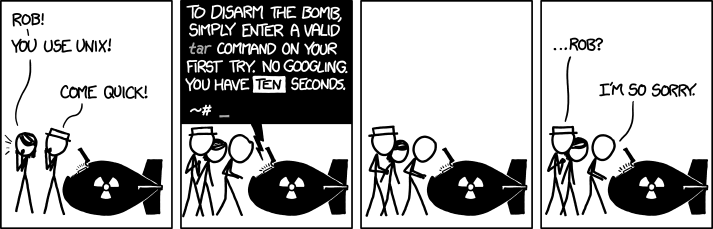
Mnemonics, in the case of how to use a tar file described in this thread. The conversation eventually refers to this doomsday scenario, so those mnemonics could save the world, some day.
Creating an interpreter to translate English(-ish) to regex (Regular Expressions) in this thread. Other comments also refer to regex a the variety of places on the web that try to clarify its opaque notation.
Community-sourced documentation was a method described in this thread. Any user of Unix or Linux is familiar with its man pages. This comment talks about simplified versions of this documentation being collected at TLDR pages. According to the site, “TLDR pages are a community effort to simplify the beloved man pages with practical examples. “
Redirection to StackOverflow in which StackOverflow is the community-supported documentation is another way developers deal with common, but not common-enough to memorize, cases as this comment describes.
What does this mean to technical writers?
There’s a recurring complaint among technical writers that no one reads technical docs. This conversation is evidence that if a feature is useful enough and unintuitive enough, that people will read them (or create work-arounds for them). For self-help content in general, however, I’m not sure that having a lot of documentation access is a worthwhile goal when it’s the result of a larger issue (e.g. a lack of usability). In fact, such traffic is often a clue that something needs attention, either in the product, the documentation, or both.
If, for whatever reason, you can’t make the product easier to use, you can use this list as a source of ideas to apply to your technical documentation strategy and help your readers.
1Brandt, J., Guo, P. J., Lewenstein, J., Dontcheva, M., & Klemmer, S. R. (2009). Two studies of opportunistic programming: interleaving web foraging, learning, and writing code (pp. 1589–1598). Presented at the Proceedings of the SIGCHI.
I’m delighted to see that the style guide includes, albeit below the fold, the advice to:
Remember that everything in this guide is a guideline, not a draconian rule.
Personally, I think this caveat should be on every page as part of the chrome, but at least it’s in the introduction. Unfortunately, my cursory review of the guide shows that the rules provide little context to help readers (in and out of Google) decide when would be good time to break a given rule and what the consequence or effect of that might be. But, this is not new. It has been a deficiency in technical communication guidelines and best practices that I’ve complained about for several years now. Maybe in v2?
Getting started
The highlights are a good place to start and provide a short cheat sheet of rules that are relatively universal and, while they don’t provide any resources or background for why these are good practices, I’m familiar with research that supports most of the suggestions, but I’m an outlier.
Hey, Google editors, for v2, please provide links to the background and research behind these guidelines to help readers–that is, the technical writers who will be applying these principles–understand why these are good practices and when they might want to make exceptions as you suggest in the opening caveat. Continue reading “Google Developer Documentation Style Guide has been released”
StackOverflow’s announcement to end their documentation beta was both disappointing and yet, not surprising. After a valiant attempt to tap into the wisdom of the crowd, StackOverflow discovered that good documentation is hard to write. As someone who’s read, written, and researched software documentation for a few decades (and with a dose of 20/20 hindsight), it was easy to see this coming in the assumptions they made or implied on their tour page and quoted here.
When we reviewed traditional documentation, two things were clear:
It had to be based on assumptions It was usually written once, often by someone not even using the technology, so it was a guess at what to focus on.
It didn’t prioritize good examples People learn best when they can see things demonstrated in actual code.
The subject of videos frequently comes up in conversations about technical communication, even in when talking about API documentation. On the one hand, they can add some zing to your technical content (and what technical content can’t use a boost in the zing department). On the other hand, they can produce a negligible, or even negative, return on the cost they took to produce.
Video genres
To make this discussion more concrete, I consider these genres:
How-to videos
Can-do videos
Meet-me videos
How-to videos
These videos describe, and usually demonstrate, a task. Ideally, they describe the end-state (goal), beginning state (you and your problem), and the steps required to take the viewer from beginning to end.
Many products, software and APIs included, have more features than meet the eye, or more applications than the viewer might realize. The line between promotional and educational can-do videos is fuzzy. While technically user education, they can seem promotional because they are promoting a capability of the product. The difference is in the tone and the call-to-action.
Until I produced a video about a Microsoft API, I didn’t think it was possible to make a compelling video about an API, especially one with no user interface. It turns out that it is possible. It just takes imagination (and a lot of effort).
The viewers’ goals for these videos is, invariably, reading (viewing) to do a task later, if only because they didn’t know they could do it before or during the video.
Meet-me videos
These are the videos in which a member of the product or development team provides a behind-the-scenes look of the product, its development, or its manufacture. When they provide information about the internal architecture and implementation that can be applied by the viewer, they can be interesting and educational.
There are many bad examples of this genre, which makes the stand out ones really stand out. The TED talk by Tony Fadell, is a great, meet-me video because in it, we learn more about him in a way that is very accessible (as in, you could do what I do, too).
The viewers’ goal for these videos is often reading (viewing) to learn, because, unlike how-to and can-do videos, it’s hard for the viewer to know, in advance, what the video will deliver in terms of knowledge or entertainment.
Which one to choose?
As always, it depends. I think the Audience-product-market framework applies to videos as it does to any other type of content. If you understand what resonates with the audience and how to present that in the prevailing market, the best type of video for that situation should be clear. Understanding the readers’ goals, of course helps bring the answer into focus.
Last week, I saw a post in LinkedIn about a “new” finding (from 2012) that “New research shows correlation between difficult to read fonts and content recall.” First, kudos for not confusing correlation and causation (although, the study was experimental and did prove a causal relationship), but the source article demonstrates an example of inappropriate generalization. To the point of this post, it also underscores the context-sensitive nature of content and how similar advice and best-practices should be tested in each specific context.
Hard to read, easy to recall?
The LinkedIn post refers to an article in the March 2012 issue of the Harvard Business Review. The HBR article starts out overgeneralizing by summarizing the finding of a small experiment as, “People recall what they’ve read better when it’s printed in smaller, less legible type.” This research was also picked up by Malcolm Gladwell’s David and Goliath, which has the effect of making it almost as true as the law of gravity.
Towards the end of the HBR article, the researcher tries to rein in the overgeneralizations by saying (emphasis mine), “Much of our research was done at a high-performing high school…It’s not clear how generalizable our findings are to low-performing schools or unmotivated students.“ …or perhaps people who are not even students? Again, kudos for trying. Further complicating the finding stated by the HBR article is that the study’s findings have not been reliably replicated in subsequent studies, other populations, or larger groups. I’m not discounting the researcher’s efforts, in fact, I agree with his observation that the conclusions don’t seem to be generalizable beyond the experiment’s scope.
Context is a high-order bit
All this reinforces the notion that when studying content and communication, context is a high-order bit1. As a high-order bit, ignoring it can have profound implications on the results. Any “best practice” or otherwise generalized advice should not be considered without including its contexts: the context in which it was derived and the context into which it will be applied.
This also reinforces the need to design content for testing–and to then test and analyze it.
1. In binary numbers, a high-order bit influences the result more than any and all of the other lower-order bits put together.
In the quest to do more with less, one method I’ve seen used to get the job done more quickly is to rely on best practices and studies. It’s not that referring to best practices or studies is bad, but they should be the starting point for decisions, not the final word. Why?
Your context is unique
This was made obvious in my dissertation study in which the effect seen by applying best practices or not depended on what was being measured (i.e. what mattered). In the API reference topics I studied, whether using headings and design elements as suggested by the prevailing best practices or not made no difference in reading performance, but they made a significant difference in how the topics were perceived by the reader.
Those results applied to the context of my experiment and they might apply to other, similar contexts, but you’d have to test them to know for sure. Does it matter? You tell me. That, too, depends on the context.
Since it relates design, comprehension, and engagement, I thought it was quite interesting. I skimmed the actual study, which seemed reasonable. I’m preparing myself, however, for what the provocative nature of the headline in the blog article is likely to produce.–the time when it will be used in the inevitable “studies show…” argument. It has all the components of great “studies show” ammo: it refers to modern design (timely), has mixed results (so you can quote the result that suits the argument), it has a catchy headline (so you don’t need to read the article or the report).
Remember, your context is unique
Starting from other studies and “best practices” is great. But, because your context is, invariably, unique, you’ll still need to test and validate.
When it comes to best practices and applying other studies, trust but verify.
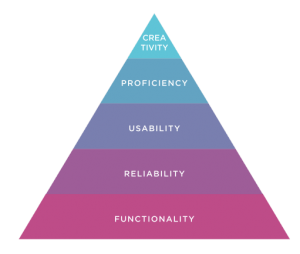
As with a product, technical content must work. The challenge is knowing what that actually means and how to measure it. Unfortunately, for a lot of content, this is fuzzy. I’m presenting a paper next month that should help provide a framework for defining this, but, as with Maslow’s triangle, you must do this before you can hope to accomplish the rest.
For technical content, like any product, you must know your audience’s needs to know what works means. At the very least, the content should support the user’s usage scenarios, such as getting started or onboarding, learning common use cases, having reference information to support infrequent, but important, usage or application questions. What this looks like is specific to the documentation and product.
Reliability
Once you know what works means, then you can tell if it does and determine if it does so consistently. Again, this requires knowledge of the audience–not unlike product design.
This is tough to differentiate from functionality, except that it has the dimension of providing the functionality over time. Measuring this is a matter of tracking the functionality metrics over time.
Usability
Once you know what content that works looks like, you can make sure it does so consistently and does so in a way that is as effortless as possible.
Separating usability from functionality is a tough one in the content case. If content is not usable, does it provide functionality? If you look close, you could separate them out. For example, a content set can have all the elements that a user requires but they can be difficult to find or navigate. Likewise, the content might all exist, but be accessible in a way that is inconvenient or disruptive to the user. As with product development, understanding the audience is essential, as is user testing to evaluate this.
Proficiency
Can readers become expert at using the documentation? One could ask if they should become experts, but in the case of a complex product that has a diverse set of features and capabilities, it’s not too hard to imagine having a correspondingly large set of documentation to help users develop expertise.
What does this look like in documentation? At the very least, the terms used the documentation should correspond to the audience’s vocabulary to facilitate searching for new topics.
Creativity
Not every product supports creativity, nor does every documentation set. However, those that do make the user feel empowered and are delightful to use. A noble, albeit difficult, goal to achieve, but something worthy of consideration.
This might take the form of community engagement in forums, or ongoing updates and tips to increase the value of the documentation and the product to the audience.
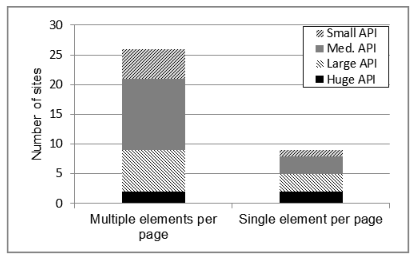
API reference topic type distribution observed in study of open-source API documentation
This question has come up a few times recently and the answer, like the answer to so many technical writing questions is, “it depends,” of course. Which begs the next question, “depends on what?”
Well, at the root, what the reader wants to accomplish, perhaps most critically, how do they want to accomplish it.
I researched this a couple of years ago and found the multi-topic/page format was used in the API reference documentation we studied to be twice as common as the the single-topic/page format.
The distribution of API reference topic type by API size
Now, because a format is more popular doesn’t necessarily mean that it’s better. Looking at this chart from the study shows that the format preference shifts towards the single-element per page format with larger APIs. It’s possible that the difference observed is nothing more than an artifact of authoring systems or organizational style guides.
Research on how people construct knowledge, however, tends to prefer the multi-topic/page format (to a point). If you are constructing knowledge about an API, you might look for an overview, some sample code, some explanations of some key methods, go back to the overview, look at some more sample code… Lather, rinse, repeat. Such a learning method is best facilitated by a big topic in which the reader can skip around to see quickly all the related information in whatever order his or her learning style desires. Doing that with each topic in a separate page requires multiple web-server accesses, each interrupting the flow for more time than in-page navigation. While the 2-3 seconds it might take for the page to load doesn’t sound like much, if it breaks the reader’s flow, it degrades the learning experience.
A key part of this learning method is the intra-page navigation–to facilitate meaningful skipping around, or random access to an otherwise sequentially oriented topic. This topic came up in a discussion about the scrollspy feature of Twitter Bootstrap, which provides some very helpful in-page navigation elements. The advantage of scrollspy is that it builds the in-page navigation when the page loads, which makes it much easier for the author (and maintainer) of the topic.