Building my first MCP server: what I learned from the inside out

I had been seeing “MCP” everywhere and I had no real idea what it was.

That’s not a comfortable admission for someone who teaches API documentation in the age of AI tools. I know what protocols are. I know what servers are. I’ve been connecting systems to other systems for a long time. And yet every time I read an explanation of MCP, something wasn’t clicking.

So, I built one.

Why reading about it wasn’t enough

The official description is accurate: MCP is the interface for an AI tool to connect to other services. The analogies help too. The official description compares it to USB-C for AI, a universal adapter that lets any model plug into any tool or data source without custom wiring for every combination.

All of that is true, yet none of it helped make it feel real to me.

I realized that I had the same experience with the Internet of Things (IoT) six years ago. I’ve spent years connecting devices to computers, but IoT, literally connecting devices to computers over the Internet, left me scratching my head. Leaning into my hands-on learning style, I built a couple of IoT applications and went on to write API documentation about the AWS IoT service for a couple of years.

As with my IoT experience, to get to the bottom of this MCP mystery, I needed a problem to solve. And there it was, right in front of me (and it’s right in front of you, too): my website.

My website has an API and 169 articles that I’ve published with no easy way to analyze how they connect to one another. I was curious whether an MCP server could help. That seemed like a safe place to start (read-only access, real data, actual use case) and concrete enough to move from theory to something running on my laptop.

I asked Claude what a content-focused MCP server could do with a site like mine. The ideas came back quickly in a list of things that normally require manually exporting the data or writing a one-off script to pull it out.

  • Content graph analysis
  • Gap identification
  • Cross-reference suggestions
  • Tag and category hygiene.

With an MCP server, these become tools Claude could call during any conversation.

This is getting interesting. An MCP server could add data from my website to a Claude conversation.

Time to get hands-on.

Let’s build one

I’ve done enough coding projects with, and without, Claude to know that incremental development is the only sane way to do them. Build the smallest thing that works, verify it, then add the next layer. Lather. Rinse. Repeat. Debugging a system with five moving parts is miserable. Debugging one moving part at a time is just working.

Claude sketched a seven-phase roadmap:

  1. Install Claude Desktop
  2. Build a minimal “hello world” MCP server (one tool, no real functionality)
  3. Add a connection to my website and verify authentication
  4. Add content retrieval tools
  5. Add basic connection analysis
  6. Build a full content graph
  7. Add draft integration for cross-reference suggestions while writing

Each phase had a clear deliverable that could be tested before moving on. This is a design habit that has saved me countless hours in the past. I know this from the hours I’ve wasted by not following it.

Phase 1 was trivial. I already had Claude Desktop installed.

Phase 2 is where things got interesting. Getting Python configured correctly on my machine took longer than expected and getting Claude to successfully call the minimal server took longer still. Log files held the secrets to both.

The “hello world” phase isn’t just scaffolding. It’s where you find out what’s broken before the real complexity arrives. If I’d skipped straight to website integration, I’d have been debugging three things at once.

Phase 3 connected the MCP server to my web server. I added the necessary security keys (not to my GitHub repo, of course). Unfortunately, the first attempt failed because Claude added a new import to the server code without mentioning it, and without me catching it in the diffs. Running the server from the command line before handing it over to Claude would have caught that immediately. Another lesson learned for next time.

Phase 4 added richer content retrieval: posts by date, by category, with excerpts or full content. This attempt worked the first time, which felt suspicious, so I tested several variations before moving on, which were also successful.

This phase is where I hit the first conversation limit on the project. Regrouping to continue in a new conversation gave me time to reflect on a useful practice: identifying tasks the MCP server should handle locally, saving AI tokens for the work that needs them. After a quick chat, Claude suggested converting the HTML to Markdown locally for faster content processing and we added the html2text Python library to the MCP server.

Phase 5 was supposed to add connection analysis, but we’d already built some of that in Phase 4. Claude recognized the drift and adjusted the roadmap rather than forcing the original structure. Plans are hypotheses. The code is the experiment.

Reviewing the results of the analysis delivered an uncomfortable finding. Claude really wanted to work with tags to identify topic relationships. I don’t tag my posts. So, the connections it found were purely category-based, which just confirmed that posts in the same category are related. Not exactly a revelation. Tagging my posts is now on the roadmap.

Phase 6 built the full content graph. Claude provided a command-line test script to verify the tool before exposing it through the MCP interface. This is a pattern to carry forward: test the component, then test the integration. Unit tests. What a concept.

The graph analysis worked, and delivered its verdict on my tagging situation with the patience of someone who had already made this point. Twice.

Zero tags across all posts means connections are purely category-based. Posts with unique category combinations have the fewest connections (bottom 10 have 2-9 connections vs. 116+ for the majority).

Message received.

After about three hours, including reheating leftovers, I pushed the code to GitHub and called it a night.

What clicked when it was running

Once I saw the server working, MCP made sense. An MCP server is middleware: a layer that handles the translation between two systems that weren’t built to talk to each other. Claude on one side, my web server on the other, and my Python server in the middle brokering the conversation.

That’s not a new idea. Service buses, API gateways, integration layers. The pattern has been around as long as there have been systems worth connecting. MCP is the pattern that is standardized for AI tools, with a spec that any model or client can implement.

I don’t say that to diminish it. Standardization is genuinely valuable. Before MCP, every AI tool that wanted to connect to external data needed its own custom integration. MCP collapses that into a common protocol, which is why adoption has been so fast.

But understanding what it is only came from building one. The abstractions didn’t land until I had something running. Seeing the interfaces in action brought everything into focus.

What happened after October

This build session took place in October 2025. Now, in February 2026, MCP looks less like an interesting experiment and more like infrastructure. OpenAI adopted it across their Agents SDK. Google DeepMind confirmed support in Gemini. Anthropic donated the specification to the Linux Foundation in December. There are now over 10,000 active MCP servers with first-class support in Claude, ChatGPT, Cursor, Gemini, and Visual Studio Code.

The fog that surrounded the term in October has largely lifted, not because the explanations got better, but because there are now enough implementations that people can see what it does.

Which is the point. If MCP still feels abstract to you, the fastest path through the fog isn’t a better article. It’s building something small.

The real takeaway

There’s a pattern to how new technology gets named and described. The terminology is promoted before the mental models can take shape, which means a lot of people spend time feeling like they’re missing something obvious. Sometimes they are. More often, the fundamental concept is straightforward but the jargon is just young.

MCP is genuinely useful. The adoption numbers aren’t hype. But the concept underneath it is more approachable that it might seem at first (or fourteenth) glance. For me, the fastest way to see what made it tick was to build a small one and watch it work. You, too, should be able to ask your favorite AI tool to help you build your own MCP server and see for yourself.

That’s what a three-hour conversation with Claude and a Python server taught me that the documentation hadn’t. And that I should tag my content. Apparently, that’s important, too.

What Makes API Documentation AI-Ready: Code Examples

In previous posts, I explored how structural principles and writing quality standards that serve human readers also serve AI tools. Those posts focused on the prose found in all technical documentation. API documentation presents an additional challenge: teaching concepts through code examples.

I asked Claude what makes code examples easy for an AI tool to process. The patterns it identified align with established principles from instructional design and technical communication pedagogy. Once again, the fundamentals endure—whether you’re teaching human developers or enabling AI tools to extract meaning from documentation.

Code presentation patterns that help processing

Claude identified the following helpful patterns for presenting code in documentation.
I’ve added comments in italics to Claude’s conversation for additional context and clarification.

Syntax highlighting with language specified

```javascript
// Language tag makes intent clear
const result = await fetchData();
```

versus unmarked blocks requiring inference

Complete, runnable examples

  • Includes necessary imports and dependencies
  • Shows actual input and expected output
  • Avoids fragments with ellipses everywhere

I discuss the nuance of this later in the article.

Inline comments explaining non-obvious logic

```python
# Convert UTC to user's local timezone before display
local_time = utc_time.astimezone(user_tz)
```

Variable names that indicate type and purpose

  • userConfig vs data
  • isAuthenticated vs flag
  • errorMessage vs msg
Continue reading “What Makes API Documentation AI-Ready: Code Examples”

What Makes Documentation AI-Ready: Structure

It’s that time again when I refresh my API Documentation course for the next term. In the course description, I emphasize that I’m teaching foundation skills to write good API documentation, not the latest tools. Students need to use tools to produce documentation, so I teach how to learn new tools while teaching those foundation skills. They learn GitHub as the representative example—experiencing both a documentation tool and how foundation skills look when instantiated as actual documentation.

After adding AI tools to the course last year, each refresh has taken more time. AI technology advances faster than I can teach the course, creating real tension: should I keep focusing on fundamentals, or chase the latest AI capabilities?

A recent Write the Docs discussion gave me the answer I needed. The conversation started with an article promoting DITA as the solution to produce AI-readable documentation. It sparked debate about tools and approaches and revealed something more fundamental: AI tools don’t need anything new to read documentation. They need the same structural principles that information scientists and technical writers have relied on for decades.

The fundamentals aren’t outdated. They’re just being rediscovered by each new technology.

What the discussion revealed

An article titled Why AI Search Needs Intent (and Why DITA XML Makes It Possible) kicked off the Write the Docs discussion by promoting DITA (Darwin Information Typing Architecture) as the solution for making documentation AI-readable. The article’s premise is solid: users often can’t articulate what they need, and structured content helps guide them to answers.

Our discussion consensus: structure is definitely important, but we had less certainty about DITA as a requirement to provide that structure. DITA does enforce topic structure and information architecture, but it requires significant overhead in authoring tools, training, workflow changes. I’ve used DITA-like tagging at several organizations. It’s not trivial. Other approaches can achieve similar results: a Markdown-based system with consistent templates and frameworks like Diataxis, for example.

Continue reading “What Makes Documentation AI-Ready: Structure”

Reflections as I begin my third time on jury duty

Diagram of an API as a gear with connection points

Today I met with my co-jurors who’ll be judging this year’s DevPortal awards nominees with me in the coming weeks. The entrants in this year’s showcase represent an impressive effort on the part of the nominees, so we have our work cut out for us. This is my third year on the jury and I’m looking forward to this year’s entries.

What struck me as we kicked off this year’s evaluation today was the 15 different award categories this year–up from last year’s eight categories–and how the presentation of APIs to the world has changed over the years. What impresses me every year is the innovation applied to make this presentation effective and engaging.

Pronovix hosts this event and they’ve modeled this year’s 15 categories around the Maturity model for devportals, which describes these three dimensions of developer portal maturity.

  • Developer experience
  • Business alignment
  • Operational maturity

When I judged the entries last year, I approached it from a usability perspective–how easily could the customer do what they needed to do? From that perspective, the maturity model dimensions represent the usability of the site from the perspectives of different stakeholders involved with an API developer’s portal.

From the perspective of ease of use, developer experience represents how easy the site makes it for the reader to get value from the product. Operational maturity represents how easy it is for contributors to add value to the developer portal. Business alignment represents how well the site makes it easy for the organization to access value.

To be successful in today’s crowded API marketplace, a developer portal must serve all three of the stakeholders these dimensions represent. The maturity model dimensions reflect how APIs must do more than just provide access to a service.

Each year, the entrants in this competition get better and the competition gets even more difficult to judge. It’s clear that the entrants are taking notes and applying what they learn.

Tap, tap…is this on?

I’m back at the blog, after a year, five months, and a couple of days. As my first blog post in a while, please be patient. It might be a bit rough.

How time flies. To catch up…

I’ve been working as technical writer since last January. Although I enjoyed working as an academic, it became clear that academia and I weren’t really cut out for each other. So, I’m back in the Pacific Northwest writing technical documentation for Amazon Web Services.

Returning to industry

It was almost as if I’d never left. I have to credit the amazing group of people I work with for making the transition a smooth one. Working in big tech is pretty much as I recall: lots to do, little time to do it—so, maybe not that different from academia.

While Amazon, in general, is famous for its short average tenure, on our team, the low average tenure is simply because we’ve been hiring new writers and we’re looking for more. We’ve got a lot of work to do! Good people, interesting work, decent pay…can’t complain, and did I mention that we’re hiring?

I’m finding the work interesting in all the dimensions that intrigue me: Technical novelty, information design, and collaboration with engineering.

The part of the product I work on has been around for a while and is still growing, so addressing the information needs of both new and experienced users presents some interesting challenges–made even more interesting by the short schedules. The collaborative group of engineers, designers, and writers I work with, however, make tackling these challenges both enjoyable and possible.

What’s new in the scholarly literature?

While catching up, I thought I’d see what’s new in the API documentation research. A quick (and by no means comprehensive) survey of the academic work that’s been published on API documentation since the list of New articles on API documentation I posted three years ago shows that software developers:

  • Still want better docs with more code samples.
  • Are still trying to create them with automation (instead of tech writers)
  • Are still not citing work from actual technical communication research.
  • Still don’t seem to do much research past surveys.

Sigh. Everything old, is new again.

I’ll organize this more later (and hopefully change some of these initial impressions for the better). In the meantime, I’m waiting for the research that explores Why is this still the case after over a decade of research pointing out the issues (repeatedly)? This 2018 paper by Murphy et al. is in the right direction by exploring some of the challenges that practitioners face trying to design usable APIs–a prerequisite for making it easier to create usable API documentation. Maybe there’s a research opportunity for a similar study with technical writers.

Nevertheless, it’s good to see all the research being published on API documentation. It’s much better than the comparative handful of articles that were available on the topic when I started researching it in 2008.

Murphy, L., Kery, M. B., Alliyu, O., Macvean, A., & Myers, B. A. (2018, October). API designers in the field: Design practices and challenges for creating usable APIs. In 2018 ieee symposium on visual languages and human-centric computing (vl/hcc) (pp. 249-258). IEEE.

Who writes docs on API docs?

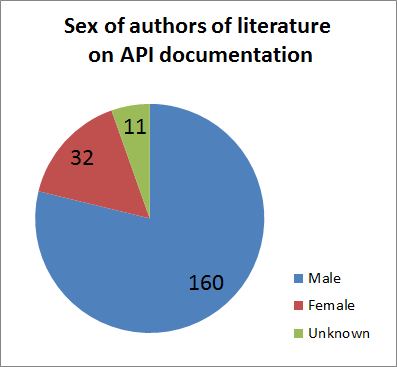
Pie chart of authors of API documentation literature showing 160 male, 32 female, and 11 unknown authors
The sex of the authors in my API documentation bibliography.

As More docs on API docs described, it’s mostly academic authors writing about API docs, but only by a narrow margin. As I was reviewing the articles I found, my impression was that only men were writing about API documentation.

Because impressions can be mistaken, I went through the articles and reviewed all the authors to determine their gender, insofar as I could. Because this information is rarely reported with the articles, I had to do some digging.

Most of my determination of an author’s gender is based on the authors given name; however, where available, I used their portrait or other references to confirm. For the names that had a recognizable (to me) gender preference, I assigned them accordingly. For those I couldn’t easily tell, I searched for the author’s profile on Google Scholar, ResearchGate, and just plain-ole’ Google to find a social media page. However, after all that, I could not make a credible determination for a little over 5% of the authors so they show up as unknown in the pie chart.

Pie chart of authors of API documentation literature showing 160 male, 32 female, and 11 unknown authors
The sex of the authors in my API documentation bibliography.

It turns out that my bibliography of 112 articles has a total of 203 unique authors; at least 160 (79%) of which seem to be men, while at least 32 (16%) seem to be women. Or, seen another way,

1 author in 6 who has written an article on API documentation is a woman.

That ratio is roughly consistent with the population of software developers reported in surveys such as Women in Software Engineering: The Sobering Stats (1/6) and 2018 Women in Tech Report (1/7).

So, what does this say?

I’m not sure. It seems like a case of: hey, 1 in 6 authors of articles about API documentation is a woman, which is in the same proportion as the software development field. And, hey, only 1 in 6 authors is a woman, which is in the same proportion as the software development field.  Also noteworthy, the earliest article in my list was authored by a woman.

More docs on API docs

I’ve tabulated my entire collection of docs on API docs for your perusing pleasure in my API documentation bibliography. The documents for which I could find links to online copies have links. The rest have restricted access. Fortunately (and somewhat surprisingly) only 14 (12.5%) of the 112 articles I’ve found so far are restricted.

The articles are sorted by year published and title so the most recent publications will appear at the top. I’ll check in every once in a while to see what’s new in the field and update the list as necessary.

I’ve reviewed each of these to varying degrees of detail. Some are, admittedly, very detailed and read like a functional software specification (i.e. as dry as the Atacama), so in those, I read just enough to pull out the classification details.

I didn’t plan this (nor was I expecting it), but the author-affiliations of all these articles break down as:

  • 47.3% of the articles were written by academic authors
  • 42.0% of the articles were written by industry authors
  • 8.9% of the articles were written by a mix (collaboration?) of industry and academic authors

Continue reading “More docs on API docs”

More articles on API documentation

I’ve just collected some more articles for my bibliography of API documentation-related articles and the trend I saw earlier this year hasn’t changed much. In all fairness, eight months is probably not enough time to see a change given the pace of academic publishing. I now have 114 articles in my list of API documentation-related topics.

114!

Searching for API DOCUMENTATION produces a lot of hits on actual API documentation (good news: there’s a lot of API Documentation out there!) Searching for Writing API Documentation produces more articles relevant to what I’m looking for. I’ve also merged my academic and non-academic API documentation bibliographic data, so I can compare and contrast them together.

The merged lists have these characteristics:

114 articles! and I know I haven’t found them all, yet.

  • 71% (81/114) of the articles are from CS-oriented sources
  • 29% (33/114) are from TC-oriented sources
  • 81% of the CS-oriented articles are from edited publications (books, journals)
  • 27% of the TC-oriented articles are from edited pubs.
  • 27% (31/114) of the API documentation articles were published in 2017

So, what does this mean?

Continue reading “More articles on API documentation”

New articles on API documentation

These are some the new articles I found while browsing Google Scholar on the subject of API documentation since my last update on the topic. I found about 20-some new articles since January, which is exciting! Here’s a review of just the ones I’ve had a chance to skim and write up, so far.

This recent trove of documents makes me happy and sad as did the papers I reviewed in an earlier post. These articles contain lots of great research into API documentation, who uses it, and how it’s used. All of these are available for download and I would encourage you to do that if you are interested in API documentation.

At the same time, I’m still disappointed that there has been absolutely zero research published on the topic from the technical communication community this year (was I really the only one who was doing that lately?!) and little to no reference to anything tech-comm related in these papers. If you know of some API research published in a tech-comm venue (and that’s not already in my list), please let me know. At this point, all this is just a warning that some of my disappointment might seep through into my article reviews.

Many of these articles (3/4) had both academic and industry authors, which suggests that industry-academy partnerships aren’t that unusual in the research of API Documentation—if you’re in computer science. In tech comm, as Tom Johnson’s recent survey laments, not so much.

Some of these articles cite earlier research in developer user studies and also contribute to that body of work. None of them, however, cite what I would call writing or reading research. That wouldn’t be so troubling, if it were just these articles, but I can’t think of an article on the topic of API documentation published in a computer science venue that talks about actually reading and using the content. At the same time, there now seems to be a recognizable genre in API documentation literature that Head et al. describes as, “finding anti-patterns in documentation” (see reviews below).

So, here’s a short review of four of the articles I read this morning.

Continue reading “New articles on API documentation”

Yes, YOU can write docs as cool as Twilio’s

After attending Write the Docs 2018 (Portland, edition) and watching a YouTube video, I’ve got it figured out: How you (i.e. anyone) can create documentation as cool as Twilio’s–a consistent entry in lists of the best API documentation examples.

All you need to do is follow these six steps:

  1. Think, plan, and work iteratively.
  2. Infuse user research and analytics into your entire writing process.
  3. Treat your documentation as a product.
  4. Do what’s best for your documentation customer.
  5. Create and support a writing process that enables contributions from outside of the writing team.
  6. Build the CMS that supports all of the above.

That’s it!

You’ll need to understand that it took them a few years to get to where they are, today. And, it sounds like they’ll keep moving the bar.

But, don’t be discouraged. The sooner you start, the sooner those three to five years will be behind you.

A little background

Twilio’s Kat King opened Write the Docs 2018 in Portland this May, starting the conference off with a strong sense of user testing and research. That always gets my attention at a tech-writing conference. The next session by Jen Lambourne continued by describing how she applied user research on documentation. I’ve been going to tech writing conferences for quite a while and I can’t recall going to one with such a user-research focus.

I’ll make references to these videos, in what follows in case you want to go straight to the source (something I always encourage). The practices they describe, however, are straight out of user-centered-design. You can also see some of my favorite books on the topic for more background.

What’s noteworthy here is that the Twilio team has applied them successfully to their documentation–proving, if nothing else, that documentation works like any other product (and perhaps works best when treated as one).

So, here’s how the steps work:

Continue reading “Yes, YOU can write docs as cool as Twilio’s”